#!/bin/bash
basedir=/var/backup/store
sqldir=$basedir/sql
PATH=/bin:/usr/bin:/sbin:/usr/sbin; export PATH
export LANG=C

for dirs in $basedir
do
        [ ! -d "$dirs" ] && mkdir -p $dirs
done

for dirs in $sqldir
do
        [ ! -d "$dirs" ] && mkdir -p $dirs
done


param1=$(date +%Y-%m-%d-%H-%M-%S)

# Database Backup
sqlusername=root
sqlpassword=Z2PG82SMtQzD
mysqldump=/usr/bin/mysqldump
bwlimit=--bwlimit=100K
#bwlimit=

sqldbname=dbispconfig
sqlsavetarget=$sqldir/$sqldbname.sql
rm -rf $sqlsavetarget.7
mv $sqlsavetarget.6 $sqlsavetarget.7
mv $sqlsavetarget.5 $sqlsavetarget.6
mv $sqlsavetarget.4 $sqlsavetarget.5
mv $sqlsavetarget.3 $sqlsavetarget.4
mv $sqlsavetarget.2 $sqlsavetarget.3
mv $sqlsavetarget.1 $sqlsavetarget.2
mv $sqlsavetarget $sqlsavetarget.1
$mysqldump -u $sqlusername -p$sqlpassword --skip-lock-tables -R $sqldbname > $sqlsavetarget

/usr/bin/rsync -ah $bwlimit --delete /etc $basedir
/usr/bin/rsync -ah $bwlimit --delete /usr/local/ispconfig $basedir
Prevent duplicate shell script executions
Method #1, pidof
I have a /var/backup/systemBackup.sh for system backup.
edit /var/backup/runsystemBackup.sh
#!/bin/bash

if pidof -x "systemBackup.sh" >/dev/null; then
        echo "Process already running"
        exit 0
fi
/var/backup/systemBackup.sh  > /dev/null &
try run /var/backup/runsystemBackup.sh
Method #2, lock file
I have a /var/backup/systemBackup.sh for system backup.
edit /var/backup/runsystemBackup.sh
#!/bin/sh

lockdir=/tmp
BACKUP=/var/backup/systemBackup.sh
LOGGER=/usr/bin/logger

if [ ! -f /$lockdir/systemBackup.sh ]; then
        touch $lockdir/systemBackup.sh

        $BACKUP
        rm $lockdir/systemBackup.sh

else
        echo "systemBackup.sh already running"
        $LOGGER -d -t SYSTEM_Backup "systemBackup.sh already running"
fi
try run /var/backup/runsystemBackup.sh
Method #3, flock with cron job
# m h dom mon dow user  command
5 0  *  *  * flock -w 0 /tmp/sqlbackup.sh.lock /var/backup/systemBackup.sh
Fixed WordPress Images not showing up with HTTPS
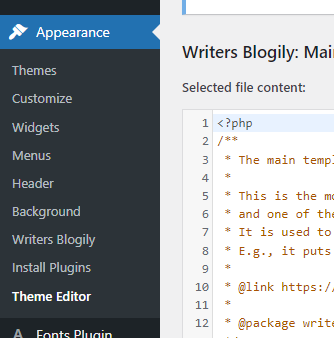
Step 1. Appearance > Theme Editor
Step 2. Find header.php at right side {Theme Files}
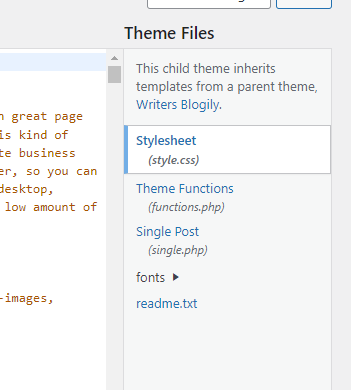
In my case, I can’t find header.php. So, I click Writers Blogily.
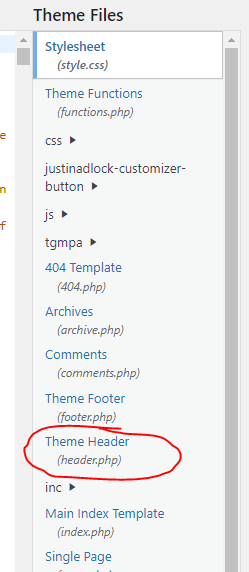
I found Theme Header (header.php) and click it.
Add a meta in html head
<meta http-equiv="Content-Security-Policy" content="upgrade-insecure-requests">
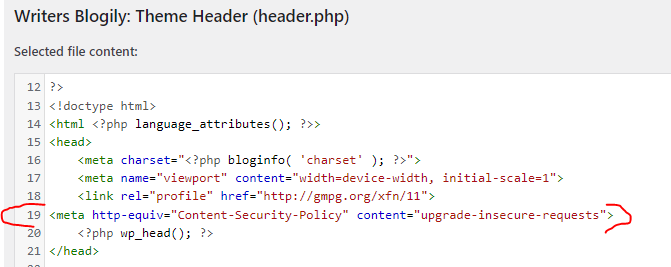
click update file button on bottom
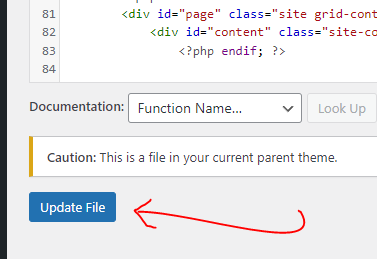
Complete! this problem was fixed
Fixed MySQL replication slave got Last_SQL_Errno: 1062
If you don’t want REDO the complete procedure, a good fix would be to use
STOP SLAVE;
SET GLOBAL sql_slave_skip_counter=1;
START SLAVE;
If there are too many such errors, a good idea would be to automate it using a bash script.
Reference : Ut xD(2017), https://serverfault.com/questions/336888/what-causes-the-mysql-error-1062-duplicate-entry-when-starting-slave, Last visit at Jan 2022
Zentyal MySQL Password
source : https://oitibs.com/how-to-access-zentyal-mysql/
Open the file located at /var/lib/zentyal/conf/zentyal-mysql.passwd and take note of the password.
Removing epoxy packaging from chips
source : https://www.youtube.com/watch?v=mT1FStxAVz4&list=WL&index=1
- Using machine remove the top packet
- In Room temperature put a drop or two of fuming nitric acid into the milled packet and waited for a while
- Put the IC on the hot plate, like ceramic container. Around 100 degree C for speed up reaction.
- keep put a drop acid on the ICs top when acid evaporation.
- Use Acetone clean the Chips.
Manuel SQL backup for ISPConfig by command line
Version 3.1.x
The following command will start cron job backup in advance.
command: cron_debug.php
php /usr/local/ispconfig/server/cron_debug.php --cronjob=500-backup.inc.php
Version 3.2.x
command: backup-now.php
Usage:
php backup-now.php --id=<4> [--type=]
Options:
--id id of the website to backup.
--type backup type: all, web or mysql. Default is all.
php /usr/local/ispconfig/server/backup-now.php --id=1 --type=mysql
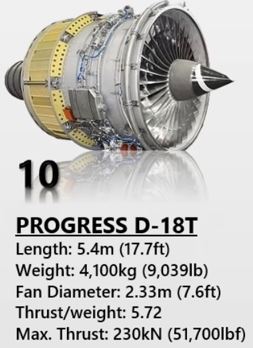
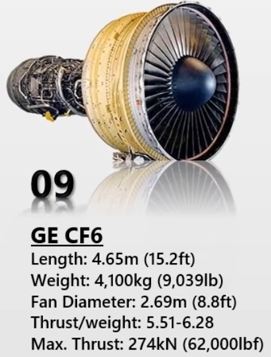
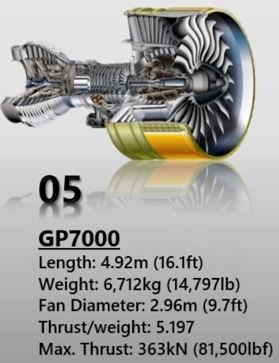
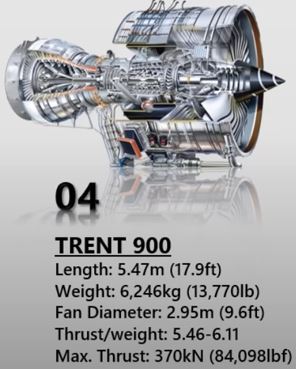
Top 10 Most Powerful Aircraft Engines In The World (2021)
Source: The Buzz(2021), https://www.youtube.com/watch?v=38J9g5aAP48





ESP32 Beginning research
ESP32 have 3 choice :
1. Chip level
2. Module level (include ESP32 Chip, include antenna, SMT PCB connection pin)
3. Development kit (include ESP32 Module, USB port, PCB solder connection pin)
制冷方式
以下內容,只為研究用途,未經核實考證。
斯林特制冷 Stirling refrigerator
渦流管制冷 vortex tube refrigeration
燒煤製冷(蒸氣噴射製冷)Steam jet cooling system